Authentication
The API service uses JWT authentication to ensure that only authorised merchants can access settlement information. The system uses JWT authentication.
JSON Web Token (JWT) is a compact, URL-safe means of representing claims to be transferred between two parties (RFC 7519).
How API Calls Are Authenticated
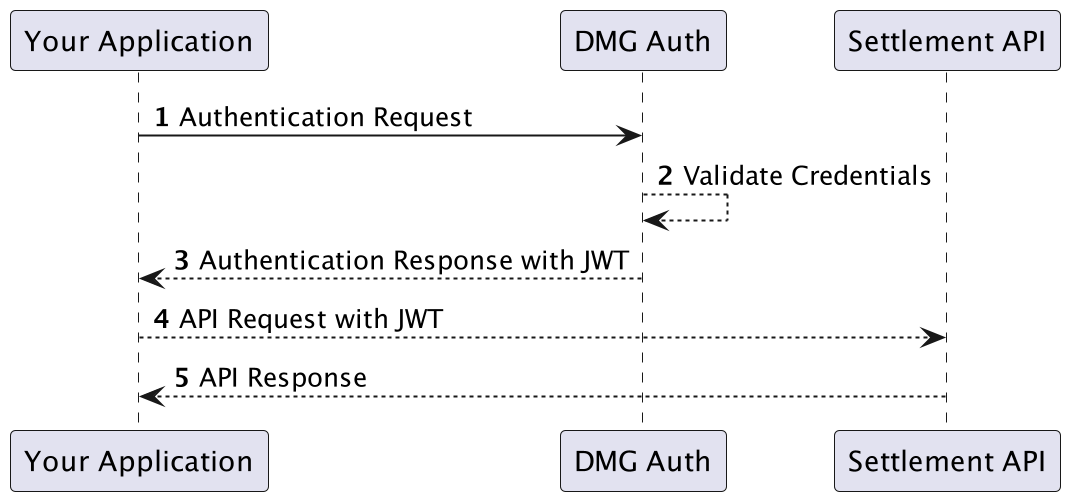
In order to securely provide DMG APIs, we implement OAuth2, specifically using the Client Credentials Grant type authentication. To successfully make requests to DMG’s APIs, an OAuth2 token must be included in the request header.
To obtain Access Tokens for your project, a POST request must be made to the endpoint https://auth.datameshgroup.io/oauth/token
using your client_id and client_secret, along with the audience set to https://api.datameshgroup.io` and the grant_type set to client_credentials.
These details should be passed in the body as a JSON payload. Please refer to our examples below for code implementation.
API Authentication Flow
API Critical Information
- AUTH URL: https://auth.datameshgroup.io/oauth/token
- ENDPOINT: https://api.in.dmgsecure.io
Note: IN inside api.in.dmgsecure.io is the region, in this case denoting INDIA.
API Authentication Example
Step 1 - Authentication Request
var axios = require("axios").default;
var access_token = ''

var options = {
  method: 'POST',
  url: 'https://auth.datameshgroup.io/oauth/token',
  headers: {'content-type': 'application/x-www-form-urlencoded'},
  data: new URLSearchParams({
    grant_type: 'client_credentials',
    client_id: 'YOUR_CLIENT_ID',
    client_secret: 'YOUR_CLIENT_SECRET',
    audience: 'YOUR_API_IDENTIFIER'
  })
};

axios.request(options).then(function (response) {
  console.log(response.data);
  access_token = j.access_token
}).catch(function (error) {
  console.error(error);
});
Step 2 - Query the Settlement API
var axios = require("axios").default;

var options = {
  method: 'GET',
  url: 'https://api.in.dmgsecure.io/v1/healthcheck/authenticated',
  headers: {'content-type': 'application/json', authorization: 'Bearer ACCESS_TOKEN'}
};

axios.request(options).then(function (response) {
  console.log(response.data);
}).catch(function (error) {
  console.error(error);
});
Sample response
{
    "access_token": "eyJhbGciOiJIUzI1NiIsInR5cCI6IkpXVCJ9.eyJzdWIiOiIxMjM0NTY3ODkwIiwibmFtZSI6IkpvaG4gRG9lIiwiaWF0IjoxNTE2MjM5MDIyfQ.SflKxwRJSMeKKF2QT4fwpMeJf36POk6yJV_adQssw5c",
    "scope": "read:mentor read:mentor:shiftReport read:mentor:settlementReport read:healthcheck read:mentor:transactions read:mentor:merchants read:mentor:terminals read:mentor:terminals:serno read:merchant read:merchant:settlement",
    "expires_in": 2592000,
    "token_type": "Bearer"
}
Break down of the response:
access_token: the value which will be used as the bearer token to authorise requestsexpires_in: The lifetime in seconds of the token. For example, the above sample response denotes that the token will expire in 30 daystoken_type: Indicates the type of token to be obtained, in our case it will be a bearer token
The access_token should be cached for the duration of specified in the expires_in field.