This document outlines how merchants can utilize the latest solution, referred to as "flavour-2," to generate secure links for the Hosted Payment Page (HPP). It also describes how these secure links can be used by merchants to create their own QR images for seamless integration.
The flavour-2 solution simplifies the process by accepting the required parameters through a single API call. The API response includes the QR image encoded in base64, which can be saved as a PNG for further processing or directly used by the merchant.
Secure Links API uses public and private keys to encrypt link used in the QR image, this prevents users from being able to generate their own links or change the link details, this prevents malicuous attacks on the merchants from the use of spoofed payments.
Benefits of the API-Driven Approach:
- Automated Link and QR Code Generation: Merchants can obtain secure links and QR images immediately upon API request, reducing manual steps and potential errors.
- Integration with SAP for Tax Invoices: This method would allow Merchants to seamlessly integrate the payment link generation within their workflow for obtaining tax invoices from SAP.
- Efficiency in Invoice Processing: Merchants can focus on the core task of invoice generation and distribution, with the QR code merging process streamlined through the API.
Overview
The following diagram illustrates the workflow required for creating the QR image via the API:
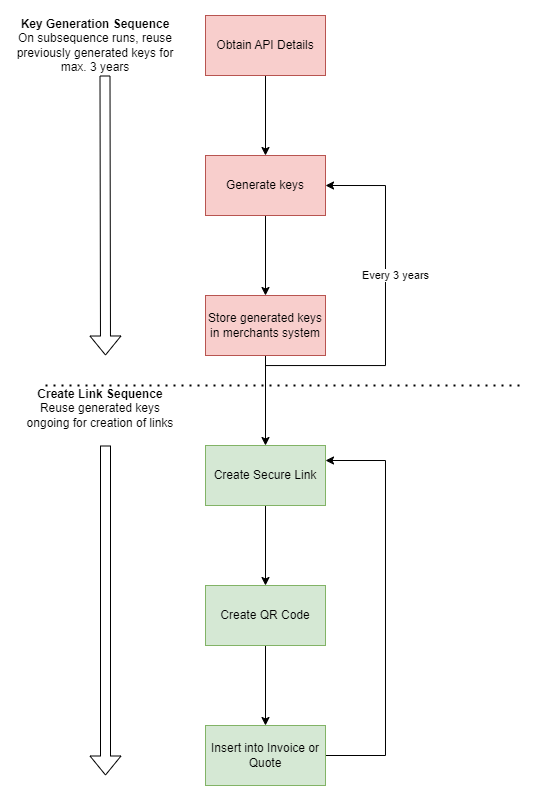
- (Merchant) Generate a public key to provide to DMG.
- (DMG) Implements the Merchants public key.
- (Merchant) Manually writes and deploys the code / actions to implement encryption of payload following the steps below.
- (Merchant) Encrypts the payload using the DMG public key and signing the encrypted payload using the merchants private key (your private key from step 1).
- (HPP) Checks the authenticity of the data using the merchant's public key which was previously provided to DMG.
- (HPP) Decrypts the encrypted payload using the HPP private key.
- (HPP) Provides back an encrypted Secure link or QR Code Base64 PNG data encrypted with the merchants public key
- (Merchant) Decrypts the provided encrypted data with the merchants private key
- (Merchant) Either embeds the provided QR Code or generates a QR code with the provided link
Definitions
HPP uses public key encryptioon or asymmetric cryptography, which provides the security and convience following industry best patrices to allow senders and receivers of encrypted communication to exchange public keys to unlock each other messages. The fundametals for this public key encryption are:
-
Public keys - The public keys as created by recievers and are given to senders before they encrypt and send information. You and DMG exchange each others' public keys.
-
Private keys - These are created by recievers and are kept to themselves. You create a private key and keep it in your system. DMG kepts its own private key on our system as well.
-
Encryption process - Sends use their private keys and receivers' public keys to encrypt the data before sending it. Receivers use their private keys's and senders' public keys to decrypt the information after receiving it. The encryption process also uses digital signatures to veritify the sender of the information.
You use your private key and DMG's public key to encrypt the payload. DMG uses its private key and your public key to decrypt the data provided by the Secure Links API. The Secure Links API on return, uses your public key to encrypt the response data back and you use your private key to decrypt the response to implement / generate the QR code.
Using Secure Links API to generate QR Codes
- Obtain API Details
- Create and Exchange Public Keys
- Encrypt the Payload
- Send to Secure Links API
- Decrypt the Response
- Embed into invoice
STEP 1. Obtaining API Details
Please contact DMG to obtain the endpoint ({DMG_API_Domain}), as well as the merchant config ID ({Merchant_Config_Id}) information prior to setting up the integration components. DMG will also provide additional information if IP whitelisting is required.
The DMG_API_Domain will be used when calling the endpoint API whilst the Merchant_Config_Id will be required to be added in the HTTP header (please see STEP 4).
STEP 2: Create and Exchange Public Keys
As part of the initial preparation, we will need to exchange our public key, namely -
| Fields | Remarks |
|---|---|
| DMG Public Key | Used for encryption of request payload send to DMG to decrypt. DMG will provide the public key to the approved merchant. |
| Merchant Public Key | Used for the encryption of the response payload before the Secure Link back to the merchant. |
| Merchant Private Key | Used for signing request payload send to DMG and used on receipt of the Secure Links API for decrypting the response payload from DMG. Do not share with DMG. |
Below is the process required to imitate the Hosted Payment Page Secure Links. Merchant is required to generate/store their key pairs, then exchange public keys with DMG. It is critical to ensure that the key pairs are unique between Production and non-production environments.
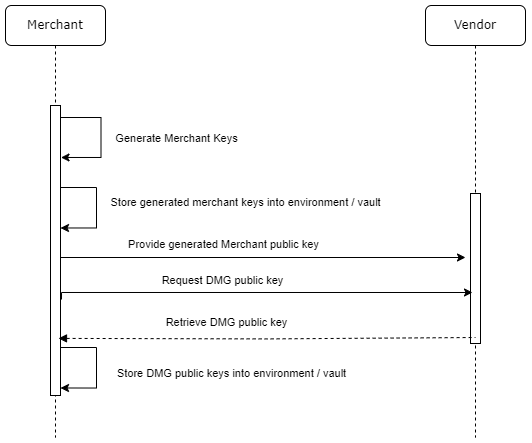
You can generate your own key pairs using a tool such as OpenSSL (https://www.openssl.org), which we have detailed in the following section.
-
Merchant or the responsible party such as internal IT, generate key using the following sub-steps:
-
Using
openssl, enter the following command to generate your private key. The command below geneates as 2048 bit RSA private key that is stored in the file private_key.pem:openssl genpkey -algorithm RSA -out private_key.pem -pkeyopt rsa_keygen_bits:2048 -
Generate the public key, this can be done using
opensslwhich generates a public key in the filepublic_key.pem:openssl rsa -pubout -in private_key.pem -out public_key.pem -
Convert the public key into Base64 URL format to assist in passing this information over to DMG.
openssl rsa -pubout -in private_key.pem -outform PEM | base64 | tr '/+' '_-' | tr -d '=' -
Generate the certificate Signing Request, feel free to enter your business address and Org name, rest can be left as defaults
openssl req -new -x509 -key private_key.pem -out cert.pem -days 365-
Generate the certificate to be placed into your system
openssl pkcs12 -export -out Cert.p12 -in cert.pem -inkey private_key.pem
-
-
Merchant stores the
merchant keypairsin their server environment by e.g., environment variables, database, vault etc. -
The merchant provides the
generated merchant public keyto DMG.
Notes: It’s merchant’s responsibility to ensure DMG public key will be kept securely and not to be shared without the awareness of DMG.
STEP 3: Encrypt the Payload
Once STEP 1 has been completed, the merchant can start integrating the solution by calling the given API endpoint using the following POST method.
Please find below the table listing out the request parameters:
Request payload
| Code | Fields | Required | Remarks |
|---|---|---|---|
expiresAt | DateTime in ISO-8601 format e.g., 2024-02-01T00:00:00.000Z | Optional |
| Field ID | Fields | Required | Remarks |
|---|---|---|---|
code | Customer Code/ID – Alphanumeric – Min 7 characters – Max 9 | Mandatory | Non-Editable in UI form |
invoiceNo | Alphanumeric – Max 255 char | Either 2 or 4 | Non-Editable in UI form |
customerName | Alphanumeric – Max 255 char | Mandatory | Non-Editable in UI form |
jobNumber | Numeric - Max 255 char | Either 2 or 4 | Non-Editable in UI form |
amount | Numeric without currency symbol and commas (,) e.g., 100000 | Mandatory | Editable in UI form |
Here is a sample JSON formatted payload before encryption:
{
   "expiresAt": "2040-01-01T00:00:00.000Z",
   "data": {
      "code": "123456789",
      "invoiceNo": "INV1234",
      "jobNumber": "JOB1234",
      "customerName": "Jane Smith",
      "amount": "100000"
   }
}
-
Generate a symmetric key - 32 random bytes using cryptostrong function
-
Create IV for AES - 16 random bytes using crypto strong function
-
Create Cipher IV - Using AES 256 bit CBC function, using the symmetric key and IV generated in the first 2 steps
-
Encode JSON string encode UTF-8 in base-64
-
Encrypt the data using RSA PKCS1 with OAEP padding using the symmetric key
-
Sign the data using merchants private key with SHA1
-
generate the final payload [IV].[encryptedSymmetricKey].[encryptedData].[signature]
- each individual peice of data needs to be separately encoded in base64 strings with dots separately each part. e.g.
UMiSCdPudhj3MNs9qTcg1w==.XRCKgiCoebo+iuWrvnbT1jNhMTJVCa3CvK3HOXYjVw/mrkA1bs0QMU3mioIWQGXcRaN81yJGe+WgTtcGAozW1CdiEmbJ4sHmBPGZkSLwQ51RyqsdDyfR5+wtE3mqXl3isaVp6RB0OtLFOD4NKj2OUd8shVgGK7AWJwZPoaSv+73Wfmt3Twlj2F4xXkrb6fAQAROKxMsArKucf6D3yULGLNK4Z3eZBC8J+4+5uupBOaxw/t5y5HbuYpdlyEQe1zTDVu2Khz/lHaYVBPkmQkbSTtDGiIN8UAUSZ0Bnwth77r7f6kQZGst7xuiVbXy1rxxxDkRntlHzI6y+XLbfYfArJA==.o0u1APdmHbxf1fUgT0y+5HFKzrTAcGGWFpestx1HtJLwq9tAiYC5RZXa4oUY/SPmonyYUKFaDqmD+O779LJ35q0OHnKuHmQv7gDW9BYxFubHq8QaUHov/tPNTqkbRvd3aKHw6fziq2qeNzofdRLOpFsd6TBT6OjE9W/4mhC6wK5spiQuHzZZsHbWRO+PPPqShOGS3McrfQmtB9RnxNOpAXF3OUpayEJeHvSn3OJB9f9rtMSdKd58/GQEmRvm6Ay2VA84x/z23g2tpygfS7jwsUH7/7LQbs4JNEy6leDj2BMqe1NniYqW9tZQ2O+EPuaBUqwm87S6hg1NVArKII1Y7bSosUdDae1GlYbe9sfv4DhqKa+8obLYepgeDITV/T3KsOMl/FJbGxLGkyN8ql9Gx/AKnq4zrOLO2GKMJt3aRKlIYh55fCLVylpG11dPgzs+xFoswRevd2x61+JjuiBjRg==.FFylCsKEVyZHTU3Rb8Btf2kX2ypG6I2GgwkTUB2uMTHvXaZAvUSwX6L20wK0hrxxal3KLkvA7_BxbIFWcyDIOxK-_nWZuGbQWfWNBfK_8mDu5itdAjFYK0qRbzdYRQuQuycom2mzjhhSeAxcJL0nx5iGX0HloKD_ZXEK16YsZsXa-T_5547-NlsD47fg6ujMK6W9IWufdzNIJJRbIyBWXTNgcdsNGvGsq18fKF37DzMi8c5Rf6W_mdEFIDbsjDJ3YA38uZYfUCDAxyuVIpcGIsgkl6rb8BAqcMOs0Do3bhNwgP_S8oVLcllZNyXH9RE8CdhJEhW_uQ2tcoDlX72Z7Q
- each individual peice of data needs to be separately encoded in base64 strings with dots separately each part. e.g.
-
Final payload to be finally encoded again in full into a base64 string
-
Payload should now be encrypted and ready to send to the Secure Links API.
STEP 4: Send to Secure Links API
After STEP 3, the merchant can now send the encrypted payload to the Secure Links API which will in return respond with a DMG encrypted response for the merchant to decrypt using the merchant private key before finally implementing or generating the QR code.
| Endpoint | Method |
|---|---|
| {DMG_API_Domain}/v1/create-links | POST |
Headers
| Key | Value |
|---|---|
| config-id | {Merchant_Config_Id} |
Request Body (application/json)
Two key JSON parameters,
- format: Optional, can be either link or qrcode (default)
- encryptedData: the encrypted data string created in previous steps
{
   "format": "link",
   "encryptedData": "djBNSjR0TldlSnBydjY1L0cxK1hEZz09LkE3VTk4SGJMVmFyTzlWdkF0TWxtdHY0dXdZRy9Cc3ZodW9aL1lpd3h0QVVWQ1F3L2JyNGhJaUtwQlVrVVExcHdCUXR4RDNzSHJYdkpHanZ6Wk9vRWdxTmF2ckp4NkkwOUptcnZKd09aNC9tOG96Qmg2bEJCcG5tZUJhZnZQOFMxRTJkL3BLRTlaZmZCdlNTVjJ1clJqUFBXdmw1cEQ5UkZJNkdtbWg4UVg4STMuUmpNbW1nZlhubG1yZkMzenpMd202V0hFY09OZXFRUEhpNnQyaFRuOFNSQlA3cGRHNXE5cGZiOEE1NmdrRkNodEZzcTlLQTduVnhBaDRUU2U3N0xWUFlUMCtQaklXWHhOMC80UDdpS2tHOTQrV25kc3ZPamM5T3h0V2l0TEwzV0ouMGRkMGYxNmM3MjE2ZWNmYmMzNGFlOTc5M2VlYmM0NmMwZGNkYWY5Njc3MWMzMDhiOTgzYzAyMWZjM2QxNDVkMWU5MzhmMjIyOGJlODkyZWU4YzQxMzgzMzk2YTQ4ZDA4ZGUwNDA1ZGFiNWM3ZGY3MzNmMWMyOTUzNzJhNzdlNjg4N2RjOGRjZTE2Mjg5YjRhNDg0ODYxOTBmNDU4ODgxMGQwMDM1YWIyNjAyZjcyOGM3YjJkMjVhOWE2ZTI0MDFhMWNhMGM3Y2Y1OGM3MTE5M2U4YmJhMjk2OGU5Mzk5OWNkMDVlMzQzNjQwZTQ3MjQwMjI1NDk5OTEyNzRmNWE3OWYz" }
Responses
| Code | |
|---|---|
| 200 | Secure Link created successfully - encrypted Secure Link and generated format returned |
| 400 | Bad request |
| 500 | Unexpected error |
With HTTP status 200 then merchant will also receive the encrypted base64 string containing the QR-image/link and output format.
STEP 5: Decrypt the Response
Upon the successfully API request then merchant will receive the QR image encrypted in base64. High level actions on what needs to be done:
- Base64 decode the response.
- Split the decoded response and individually base64 decode each part
- Decrypt the symmetric key using the merchant private key with padding RSA PKCS1 OAEP Padding.
- Decrypt the data using the decrypted symmetric key and IV using AES 256 CBC with UTF-8.
- With the decrypted data, implement into the invoice as per the next step (6a or 6b).
STEP 6a: Embed into invoice (qrcode format)
From the decrypted string, follow the following steps:
- Decode the Base64 String to PNG Binary Format.
- Save as PNG Image File
- Merge existing SAP Tax File Invoices with PNG QR Code Image.
QR image can then be used by merchant embedding it into the tax invoice.
STEP 6b: Embed into invoice (link format)
From the decrypted string, follow the following steps:
- Decode the Base64 String to an Unencrypted Secure Link.
- Using the Unencrypted Secure Link, create the QR Code Image
- Implement the QR Code Image into the SAP Tax File Invoices.
QR image can then be used by merchant embedding it into the tax invoice.
Detail Explanation - Secure Link Flows for QR creation
This section explains in detail how the Secure Links API solution works to better understand how to integrate into the merchants solution.
Secure Link Creation Flow
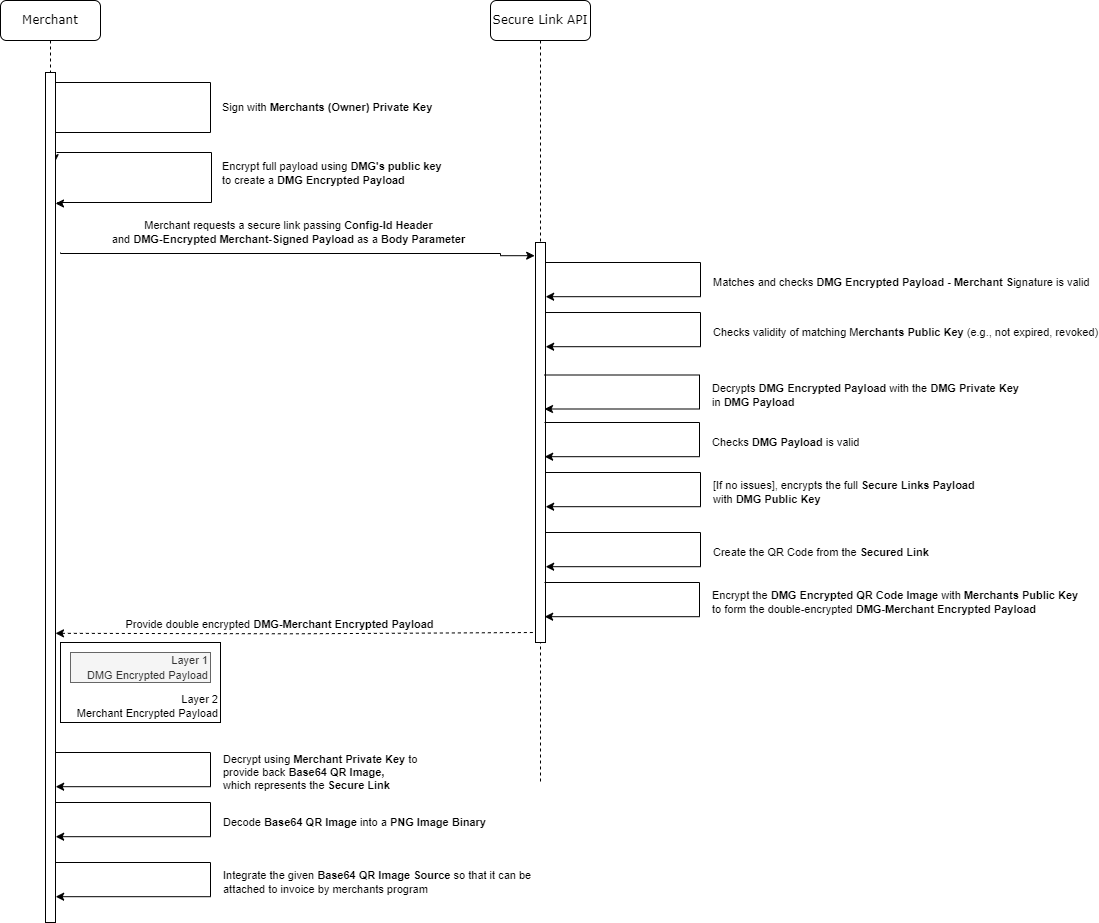
The Secure Link creation flow is shown below, the intention of this flow is to reduce the complexity of the merchant creating QR codes while not sacrificing the security of the QR codes generated by the following flow:
- Merchant encrypts payload using
DMG's public keyand signs using themerchant private key.- Use a cryptographic library to generate a random symmetric key and an initialization vector (IV).
- Encrypt the unencrypted parameters with the generated symmetric key and IV.
- Encrypt the symmetric key using the vendor's public key. This ensures that only the vendor can decrypt the symmetric key.
- Use the merchant's private key to sign the unencrypted parameters. This signature will be used for data integrity verification.
- Concatenate the IV, encrypted symmetric key, encrypted parameters, and the signature into a single string. This will be shown as IV.encryptedSymmetricKey.encryptedParams.signature
- Encode the concatenated string in base64url format to ensure it's safe for use in URLs.
- Pass the Encoded string to the Secure Links API
- Merchant sends a request to Secure Link API passing the
encrypted payloadabove. - Secure Links API decrypts the payload using its own
DMG's private key. - Secure Links API picks up the payload
signature, determines that the signature is valid (payload hasn’t been tampered with). - Secure Links API checks the validity of the
merchant public key(e.g., not older than 3 years old, not revoked etc). - Checks the
payloadis valid, and the format matches the intended validation rules. - At this point, if everything above passes, Secure Links API encrypts the payload using the
merchant public key. - Secure Link API then sends the
merchant-public-key encrypted QR-image / Linkback to the merchant. - The merchant receives the
merchant-public-key encrypted QR-image / Linkand decrypts it with theirmerchant's private key. - Merchant attaches the
QR imageor uses theLinkto generate QR Code onto e.g., invoices by the merchant program.
In more detail, the intended flow and rough API calls will be as follows:
- Merchant obtains API details.
- The merchant creates keypairs, the merchant receives the key pair (Private Key and Public Key) and stores it for future reference.
Please keep Private Key private, DMG will never ask for it.
- The merchant provides the merchant public key to the vendor.
- The merchant creates a secure link, first by encrypting the payload with the DMG's public key and signing with merchant’s private key.
Example JSON payload to encrypt is as follows:
{
   "expiresAt": "2040-01-01T00:00:00.000Z",
   "data": {
      "code": "123456789",
      "invoiceNo": "INV1234",
      "jobNumber": "JOB1234",
      "customerName": "Jane Smith",
      "amount": "100000"
   }
}
The above command will create the following encrypted payload e.g.
bEJ5OU5CVFkxMFgwM2ZVMng0OWpMdz09LkJlNkl2T3BCQ0xyeks5Wm9WVmFPSzR1MHk5aWx4L3RPd1M5VXptMWtubWplSnF2bzFUaWU2VXpmSjBZdTk0Ujk5bTJGTGNlZy9zYzRDUUNuQUtzdkhWK3B0SE1rRzFVclhTSVV1RWJrUXoreVVYb0VScjc4dnJJeGhadEFwRytXOFVWZnNDSklpNkpaaUxsU01US1NPeTdrZ0pZZ01aMTMxbUw3WElhaDJHQTIuWXBXTDNzS3cwYnhRNFZVVjdNUjBMZ3VLNFFpS0Y2ajVNNjRUUW92NEorNFFkUjY1cStlMFdTWDhPbGdPd3BDNUZHc09kOGVXV0lNWEZFakt5NkY5cTJ1b2NFUUVQTUpMSkpWanBTL3hnVjA9LjAxMDVkZTM3ZThlZWQ1ODZiMmI4NDA1MWVlOTMxZDgzNjc5YWRhNmVlYTRjYTYyYjNjNjk1ZmIxMWI4ZmVlZDk5OGI3ZWM2ZWYyMmNhODIzMmE1MzE5ZjNiNjJlZTZlOTNmNzlmNDZjZjFkMjk3NmI4ODc3N2FhOTBhYjU4N2M2ODJhMTQ1ZDM4MzY2MTUyMzM1NjRkM2E2MzI1MTVkMDUzMDJjYzQzZjgyYjIzMzNiNDEzZmY1NWZhMGMxMDZlMmFiN2UwMTYyNTM1ZGQyODc5Mzc1N2Q3ZWExZWZmNGMwY2EwZjg4M2QxOGExZDQyN2Y5ZTAyYmY1NmVlZjU5MTkxMA
- Pass the encrypted payload to the secure links API, returning a merchant encrypted QR image
POST {DMG_API_Domain}/api/v1/links
Request Body (JSON)
{ "format": "link", "encryptedData": "<encrypted payload>" }
200 Response
{ "data": "<base64 merchant encrypted image>", "format": "link" }
- Merchant decrypts the merchant encrypted QR-image / Link with their private key, returning the base64 QR image ready for attaching or link to generate the QR Code image themselves
- Merchant attaches the QR image onto e.g., customer invoice
Secure Link Decryption Flow
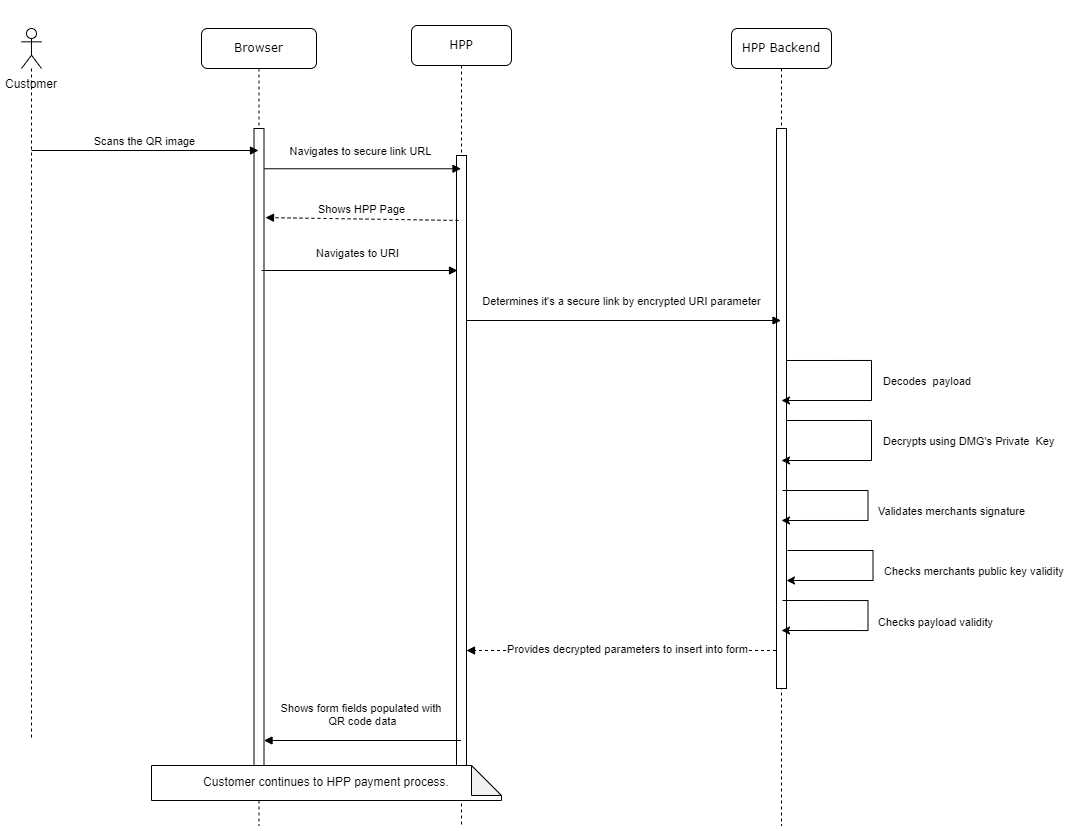
When a user receives and clicks on a link, the following journey takes place, below is a scenario of a payer scanning the QR code with their phone:
- The user (Payer) scans the QR code with their phone.
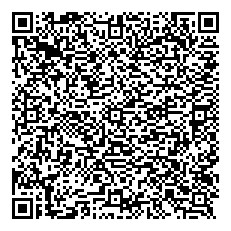
- The phone image software decodes the image and determines it’s a QR code with a hyperlink.
https://hosted-page.ecomm.dmgsecure.io/48b21728e42c02a5e0aa5d704e3468eebffb8262e339f7def0e575b778d309fde2de953c36a1800154eb7b007978701809d86cc86c1de1d956fddc1460afc0868d541310c2865afe9968503f0dd7a398418fd01def4f95a5c43b192b04bf6b2e5cfe0da8b592e7454a1bf71645444578186c5606f7a33bf9045d770b4e6dd35f8c76355ee883e003d61ebec4c30cc3edbe388da6ee639b25dbe5ca4d06b315f627220af28148defd22313ea5ba8cddd7
- The user clicks the hyperlink which then opens up their browser.
- The browser obtains the URI provided and navigates to the HPP with the secure link parameter attached.
- The HPP Web app gets downloaded and checks to see if there is a secure link to process.
- If it is a secure link, it extracts the encrypted parameter and passes it to the HPP backend to safely decrypt it.
48b21728e42c02a5e0aa5d704e3468eebffb8262e339f7def0e575b778d309fde2de953c36a1800154eb7b007978701809d86cc86c1de1d956fddc1460afc0868d541310c2865afe9968503f0dd7a398418fd01def4f95a5c43b192b04bf6b2e5cfe0da8b592e7454a1bf71645444578186c5606f7a33bf9045d770b4e6dd35f8c76355ee883e003d61ebec4c30cc3edbe388da6ee639b25dbe5ca4d06b315f627220af28148defd22313ea5ba8cddd7
- The HPP backend gets a request from the HPP Webapp via a specific endpoint containing the encrypted payload.
- We extract the encrypted string and decode it from base64url into binary.
- The decoded encrypted string checks for a signature and if there is a match, it continues to decode the link.
- If the signature doesn't match, it stops before the description with an error message.
- It then checks the validity of the merchant keys, again if it’s expired or revoked, an error message is given to the end user.
- The encrypted string is checked for a matching active DMG private key.
- If a matching DMG private key is found, it decrypts the data into JSON.
- HPP continues to process the data, transforming it to form values as shown below.
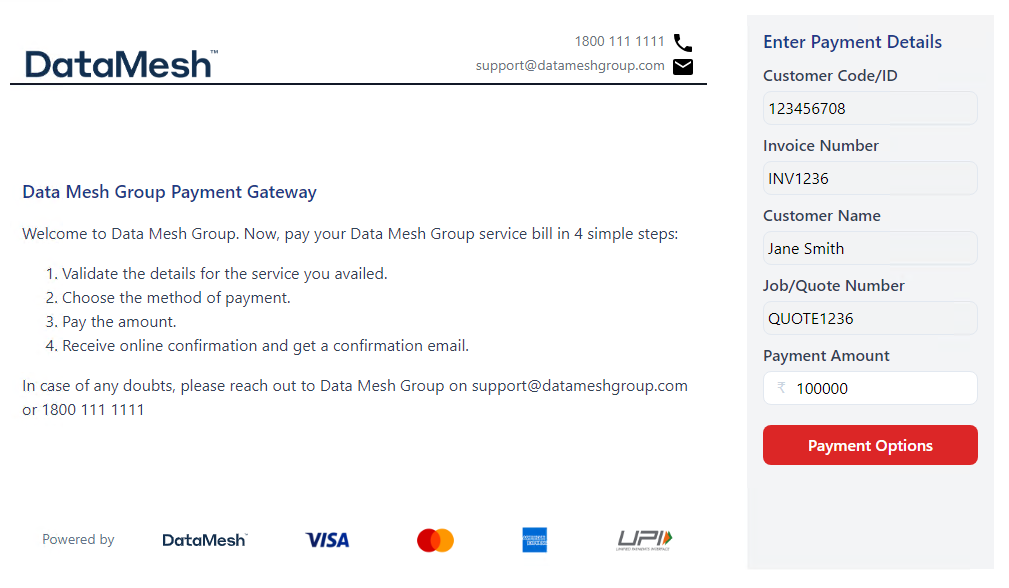
Note, the above API is a proof of concept, final design may differ, and more detailed API specification will be created for the merchant follow and separately another document within DMG engineers to follow.
Encrypted Key Pairs in Detail
Links will be encrypted through Secure Links API to create QR coded images. In summary, the encryption process will be as follows which ensures not only that the data is encrypted but is only created by the merchant.
Key Management
Merchant creates a keypair which the public key is passed to the vendor and stored in a Database, each keypair has a validity of 3 years with a notification sent to the merchant 6 months before expiration letting them know they are up for renewal. After the 3-year mark, the system revokes the certificate and all secure links attempted to be encrypted with an expired certificate will fail with a “certificate expired” error.
DMG encrypts their root certificate using a special endpoint with a secret only DMG knows.
Steps for encryption
- Generate the merchant public and private key pairs.
- Sign the data with the merchant's private key.
- The signature is added to the payload to be sent to DMG to create the secure link.
- Create a random symmetric key for encrypting the data.
- Create the Initialization Vector (IV) randomly generated, this needs to be randomized for each generated link and will be part of the final encrypted text (note, 16 bytes must match HPP Backend to decrypt successfully)
- Encrypt the data using the symmetric key and IV generated previously.
- Encrypt the symmetric key with DMG’s public key.
- Concatenate the generated values together.
- With the created cipher object, we can then feed in the URL Params (Plaintext) intended to be encrypted.
- In the final step, you’ll need to add the IV symmetric key, encrypted string and signature together, this will form the encrypted payload to append after the forward slash after the HPP domain name.
- Then QR code is created
- Before sending it back to the merchant, Secure Links API encrypts the QR code image using the
Merchant's Public Key Encrypted Datais then sent back to the merchant to decrypt.- Which can then be inserted into e.g., invoices, and quotes for the customers to scan see QR Code Generation section below.
Note, private key stays within the merchant's environment, we will not ask for this. Care must be taken not to host this externally as this will allow others to generate invoices on behalf of the merchant.
QR codes will be generated within the DMG Secure Links API.
If everything is correct above, the Secure Links should successfully decrypt and decode into the correct form fields.
Steps for decryption by the merchant
- Merchant receives a base64url encrypted QR code.
- They decode it from base64url into a string.
- Merchant decrypts the data into an image blob.
- Begin by converting the base64-encoded string into binary format. This step prepares these components for the decryption process.
- Use the merchant's private key to decrypt the encrypted symmetric key. This decryption should be done using the given padding scheme.
- Prepare for decryption. This involves creating a decryption stream and requires two key pieces of information: the decrypted symmetric key (from the previous step) and the IV.
- Pass the encrypted data through the decryption stream. Convert it from base64 to UTF-8 during this process. This step will transform the encrypted data back into its original, readable format.
- The decrypted data is now in its original, unencrypted form and can be used as needed in the application.
- Merchant converts to a QR code image and places into invoice.
Note, the above is an overview, please review to our more detailed integration document that will be sent separately.
Steps for decryption - DMG
- We received the link with the encrypted link.
- We extract the encrypted string and decode it.
- The decoded string checks for a signature and if there is a match, it continues to decode the link.
- If the signature doesn't match, it stops with an error message.
- The encrypted string is checked for a matching active DMG key pair
- If a matching DMG key pair is found, it decrypts the data.
- HPP continues to process the data, transforming it into valid form values.